Replacing Remote Desktop Services with Nextcloud
Remote Desktop Services (RDS) was the right answer for a lot of businesses a decade ago: put everything on session hosts in one place, hand every staff member an RDP shortcut, and the whole company works inside the same Windows environment from anywhere. It still works — but it ages badly. Every application, every file, every mail client sits behind a growing stack of Windows servers, client access licences and profile plumbing, and the whole experience lives or dies on the health of a handful of session hosts at a single site — and on the network bandwidth at every site in between, which is never guaranteed. Video and audio are effectively non-existent over a remote session, so online meetings get bodged together on the local desktop instead, splitting staff between two environments just to get through a call.
This case study describes how one of our clients moved their day-to-day work off an RDS-centred environment and onto a managed Nextcloud platform — and what stayed on RDS, because an honest migration story includes the part that doesn’t move.
The starting point: everything through RDP, everything at one site
Before the project, the environment looked like a classic single-site Windows stack:
- Active Directory domain controllers
- A Windows file server holding all company data
- On-premises Exchange for mail and calendars
- A mail gateway in front of Exchange
- User Profile Disks for the RDS session state
- Application servers for a Windows-only accounting package
- Multiple RDS session hosts carrying the daily workload
Staff logged into a remote desktop for everything: Outlook, Office, file shares, the accounting system. It worked, but the costs were structural. Every user meant RDS CALs, Windows licensing and session host capacity. Every Office document meant an Office licence on the session hosts. Profile disks and session hosts generated a steady stream of support tickets. And the entire business ran from one site — a serious outage there was a serious outage everywhere.
The destination: browser-first, with the desktop where it earns its place
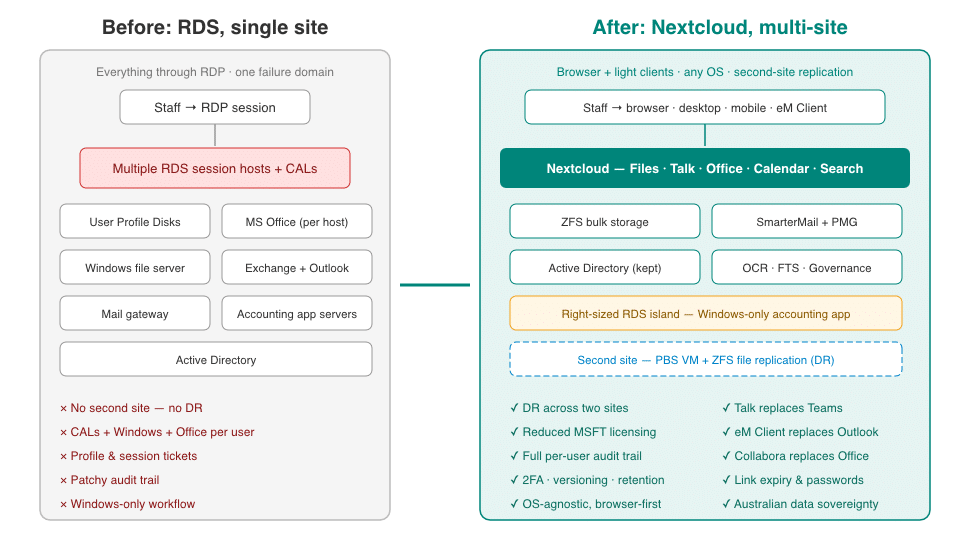
Architecture diagram: before and after — a single-site RDS stack with session hosts, User Profile Disks, Windows file server, Exchange and accounting app servers, replaced by a multi-site Nextcloud platform with ZFS storage, SmarterMail and PMG, retained Active Directory, a right-sized RDS island for the Windows-only accounting application, and PBS plus ZFS replication to a second site for disaster recovery
The replacement platform is a managed Nextcloud instance backed by ZFS storage, with the surrounding services rebuilt as a deliberately smaller, multi-site stack:
- Nextcloud as the front door for files, collaboration, chat, video and office documents
- ZFS bulk storage for company data, replicated to a second site
- Proxmox Backup Server replication of the virtual machines to the second site
- Proxmox Mail Gateway for mail filtering, now running multi-site
- Exchange retired in favour of SmarterMail, with eM Client replacing Outlook on the desktop
- Active Directory retained as the identity source, connected to Nextcloud over LDAP
The design principle throughout: work should happen in the browser or in a lightweight desktop client talking to Nextcloud — not inside a remote Windows session. That single shift is what unwinds most of the RDS stack.
Active Directory integration: the changeover without the user churn
The riskiest part of any platform migration is identity. Here it was a non-event. Nextcloud connects directly to the existing Active Directory, so every user signs in with the same username and password they used on the remote desktop. Group membership in AD drives what people can see in Nextcloud, and disabling an account in AD cuts off Nextcloud access in the same action.
For the business, that meant no new credentials to issue, no parallel user database to maintain, and a user management workflow that stayed exactly where the administrators already worked.
Permissions and team segmentation
Company data was restructured into clearly segmented team areas, with access controlled by group membership. Each team sees its own areas; shared collaboration spaces are gated the same way. Because permissions flow from directory groups rather than ad-hoc sharing, joiners and leavers are handled by moving people between groups — the file access follows automatically.
This replaced years of accumulated nested-share complexity on the old file server with a flat, auditable structure that both the client and our engineers can reason about at a glance.
Files: replacing the file server, inside and out
Nextcloud replaced the Windows file server as the way staff reach company data — through the browser, the desktop sync client, or mobile apps. The bulk data itself lives on ZFS, chosen for its snapshot, rollback and replication capabilities: point-in-time recovery of files is built into the storage layer, and the whole dataset replicates to the second site.
External sharing changed just as much as internal access. Instead of emailing attachments or reaching for a third-party transfer service, staff share links directly from Nextcloud — with expiry dates and password protection applied to anything leaving the business. Large documents that could never travel by email move as a link in seconds, and the business controls the link, not a third party.
Mail: eM Client, SmarterMail and cloud attachments
Retiring Exchange removed one of the heaviest servers in the old stack. Mail now runs on SmarterMail behind a multi-site Proxmox Mail Gateway, and staff use eM Client in place of Outlook — a familiar mail-calendar-contacts layout with no session host in the path. eM Client on mobile delivers the same consistent experience across devices, matching the Exchange feature set at a fraction of the cost — with file sharing and online meetings running privacy-first on the client’s own platform, meeting compliance and data locality requirements along the way.
The standout workflow is eM Client’s Nextcloud integration. Attachments can be sent as Nextcloud links straight from the compose window — with the same expiry and password controls — and incoming attachments can be uploaded directly into Nextcloud without touching the web interface. Files move between mail and the company’s storage seamlessly, and every one of those movements happens under the company’s own audit trail rather than scattering copies across mailboxes.
Calendars that actually manage the team
Calendaring moved to Nextcloud over CalDAV, connected into eM Client. The business gained more scheduling flexibility than it had on Exchange: shared team calendars, resource-style calendars for tracking who’s on leave, and separate calendars per team requirement — all visible in the mail client and the browser alike. Managing holidays and cross-team availability is now a calendar view, not a spreadsheet.
Talk: replacing Teams, integrated with mail
Nextcloud Talk replaced Microsoft Teams for staff chat, calls and video meetings — running on the same platform as the files, so a document shared in a conversation is the document, not another copy.
Online meetings are scheduled directly from eM Client: Talk is available as the meeting provider when creating a calendar event, so booking a video call works the way staff expect from the Outlook-and-Teams world — invite, link, join — without any Microsoft service in the loop. External participants join Talk meetings from a browser with nothing to install.
Nextcloud Office: the end of the Office licence on the session host
Documents, spreadsheets and presentations are edited in Nextcloud Office (Collabora) in the browser, with real-time co-editing when several people work on the same file. This is the piece that makes the platform genuinely OS-agnostic: a staff member on Windows, macOS, Linux, a tablet or a loaner laptop gets the same editing experience, because the workflow lives in the browser rather than in locally installed software.
It also ended the practice of licensing Microsoft Office across session hosts for users whose editing needs are met — comfortably — in the browser.
Search, OCR and governance
Three capabilities from our managed platform round out the document story:
- Full-text search, backed by a dedicated search index, finds documents by their contents — including files on the bulk storage — with results filtered to what each user is permitted to see.
- OCR processing converts scanned paperwork into searchable PDFs automatically, so the filing cabinet’s worth of scans that migrated from the old file server became findable rather than just stored.
- The Governance Pack adds file access control rules, automated tagging and retention policies — the same governance layer described in our legal-practice case study, applied here to a general business: documents are classified as they arrive and retained according to policy rather than habit.
Audit: every file touched, on the record
Every action through Nextcloud — opens, downloads, edits, shares, deletions — is written to an audit log attributed to the real named user, regardless of which device or client they used. The log is rotated and retained long-term as part of the managed service.
On the old environment, answering “who accessed this file and when?” meant hoping Windows auditing had been configured, and had been kept. Now it’s a search. For a business handling other people’s information, that audit trail — combined with retention policies — is a compliance posture, not just a technical feature.
Security and privacy
The security baseline tightened across the board:
- Two-factor authentication enforced for every account — natively on the platform, replacing the third-party bolt-on that RDS needed to achieve the same thing.
- File versioning on by default, so accidental overwrites are a restore, not an incident. The old file server relied on volume shadow copies for this — a feature that works until it quietly doesn’t, and whose failures are typically discovered at the moment a restore is needed. Versioning here is part of the platform, not a scheduled task to babysit.
- A dramatically smaller attack surface: no RDP exposed for general staff use, fewer Windows servers to patch, and services split across purpose-built components instead of concentrated on session hosts.
- Data sovereignty: everything — files, mail, chat, video, documents — runs on Australian-hosted infrastructure under the client’s control, not spread across overseas SaaS platforms. Staff communications and company data stay within a system the business can point to, audit and govern.
Device rollout without an IT department
The next phase of the wider project slots device management in over the top, so that laptop and mobile configuration is pushed, not typed: a staff member signs in with their AD credentials and mail, files and Talk are configured for them, with no setup document to follow. That piece sits alongside Nextcloud rather than inside it, but it’s what makes the platform practical for a workforce with no in-house IT.
Nothing about the platform requires a domain-joined machine just to reach a file — and where remote access runs through a VPN, that’s a deliberate security decision the organisation makes on its own requirements, not plumbing the platform can’t work without. In this design a VPN protecting Nextcloud and Active Directory is a strengthening of the posture, and the architecture supports it cleanly either way.
What stayed on RDS — and why that’s fine
One system didn’t move: a specialised accounting package that only runs on Windows and is used remotely by a number of staff. Those users still reach it through a right-sized remote desktop environment — but that’s now all RDS does. File access for those same users goes through Nextcloud like everyone else, so the audit trail and permissions model stay intact.
This matters as a pattern. Very few businesses can eliminate every Windows-only application on day one, and a migration plan that pretends otherwise fails. Shrinking RDS to a single-purpose island — instead of the platform everything runs on — captures almost all of the benefit while keeping the one workload that genuinely needs it.
The outcome
- Fewer servers, less complexity — the Exchange, profile-disk and general-purpose session host layers are gone; what remains is smaller and purpose-built.
- Reduced Microsoft licensing — RDS CALs, Office on session hosts and Exchange licensing all shrank or disappeared.
- Disaster recovery that didn’t exist before — VM replication and ZFS file replication to a second site turned a single-site business into one that can lose a site and keep working.
- A stronger security and compliance position — 2FA everywhere, full per-user audit, versioning, retention policies and Australian data sovereignty.
- Happier staff and less support — work happens in a browser and a familiar mail client instead of inside a remote session; profile and session issues, the old ticket generators, went away with the session hosts.
- Flexibility to grow — new capability is a Nextcloud app away, not another Windows server.
Is your business still living inside a remote desktop?
If your team’s daily work runs through RDP — Outlook, Office and file shares on a session host — this migration pattern likely applies to you: keep Active Directory, keep the one application that truly needs Windows, and move everything else to a platform your staff reach from any device, anywhere, with every file access on the record.
More case Studies
A business running everything through remote desktop moved daily work to Nextcloud, retired Exchange, kept one Windows only accounting application on a much smaller remote desktop footprint, and gained replication to a second site.
A small legal practice replaced a shared drive of unsearchable scanned PDFs, a per-envelope e-signature subscription and a scatter of spreadsheets with one Nextcloud platform. Documents are now found by their content, signing is a platform feature rather than a recurring fee, and client data stays on Australian infrastructure.