One Browser, Every Operating System
Running a Distributed Team on Nextcloud
Most cloud platforms are built around an assumption: everyone in your business runs the same operating system, works from the same place, and is happy sharing infrastructure with tens of thousands of other organisations. For a distributed team, none of those assumptions hold.
This case study describes how an Australian technology consultancy runs its entire day-to-day operation — files, email, meetings, chat, project boards, documentation, real-time document editing and even its software development workflow — through a managed Nextcloud platform hosted by Velocity Host on Australian infrastructure. The team is spread across multiple locations and time zones, uses Windows, Linux and macOS side by side, and does almost everything in a web browser.
The client
A small Australian technology consultancy with a fully distributed team. There is no head office that everything depends on. Staff work from home offices, client sites and on the road, on whatever machine suits them — Windows laptops, Linux workstations, MacBooks, and iOS and Android devices in the field.
The business needed a platform that treated every operating system and every location as a first-class citizen, without forcing a standard operating environment on people, and without scattering its data across half a dozen overseas SaaS subscriptions.
The challenge
- SaaS sprawl — or hyperscale consolidation. The typical distributed-team stack is one vendor for chat, another for video meetings, another for project boards, another for file sync, another for email, another for documentation. Each is a separate subscription, a separate login, a separate admin console and a separate place your data lives. The usual escape is consolidating into one of the hyperscale productivity suites — which trades sprawl for a different set of problems: your organisation becomes one tenant among hundreds of millions on the world’s most attacked platforms, capabilities like advanced auditing and retention sit behind escalating per-user licence tiers, everything runs on proprietary protocols that make leaving progressively harder, and your data ultimately answers to an offshore vendor’s jurisdiction regardless of which storage region you tick.
- Operating system lock-in. Toolchains built around one desktop OS punish the people who don’t run it. A mixed Windows / Linux / macOS team needs tools that behave identically everywhere.
- Shared platforms, shared risk. Big multi-tenant cloud suites put your organisation on the same platform as tens of thousands of others. You inherit their attack surface, their outages and their vendors’ data-handling decisions.
- Data sovereignty. The consultancy wanted its data held in Australia, by an Australian-owned company, under Australian jurisdiction — not routed through offshore regions as a configuration afterthought.
- Working globally. Whatever the answer was, it had to work the same from a hotel on the other side of the world as it does from a home office — first-class access from anywhere, not a degraded remote experience.
The solution: a browser-first platform on Australian infrastructure
Velocity Host deployed a dedicated, hardened Nextcloud instance for the consultancy — a private platform designed for one organisation, not a slice of a shared one — paired with VelocityMail email hosting protected by vProtect spam and threat filtering. Everything below is standard platform capability, running on Australian infrastructure and backed up as standard; this client also takes the optional disaster-recovery replication to a second data centre.
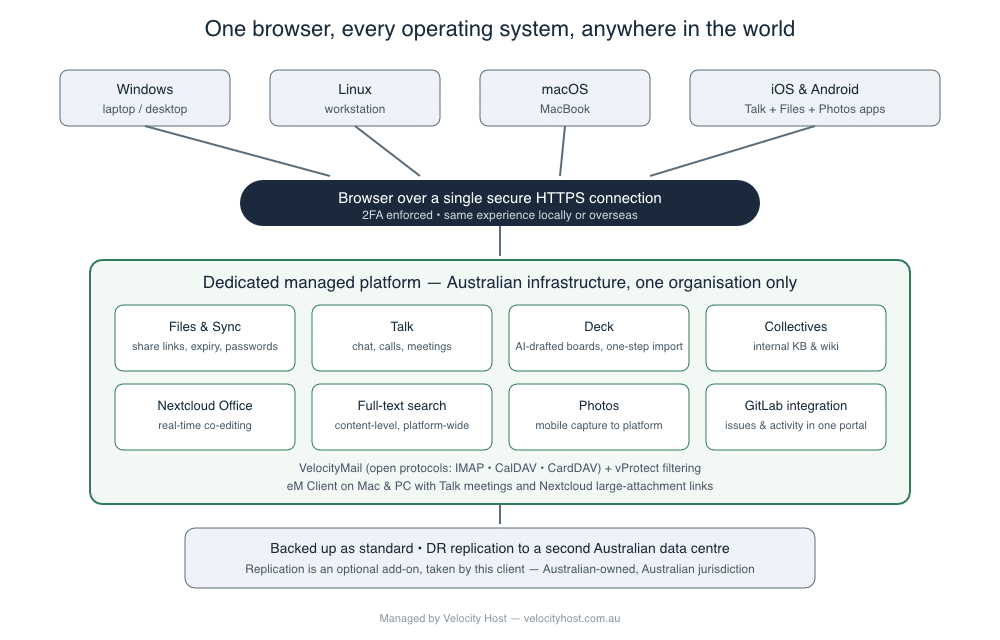
Diagram: Windows, Linux, macOS and mobile devices connecting through a browser over one secure HTTPS connection to a dedicated managed Nextcloud and VelocityMail platform on Australian infrastructure, replicated to a second data centre for disaster recovery
The defining design choice: everything important happens in a browser over a single secure HTTPS connection. If a device can run a modern browser, it is a fully capable workstation. The operating system underneath stops mattering.
One platform, every operating system
Files, email, calendars, chat, video meetings, project boards, documentation and document editing are all reached through the browser, and they look and behave identically on Windows, Linux and macOS. New team members are productive on day one with whatever hardware they already own.
For those who want deeper desktop integration, the Nextcloud desktop sync client runs natively on all three operating systems, keeping chosen folders synchronised locally and making it seamless to move files between the desktop and the platform. But it’s optional — the browser alone is a complete working environment.
Email done on open standards — VelocityMail with eM Client
Email runs on VelocityMail, Velocity Host’s Australian-hosted email platform, with vProtect filtering inbound threats before they ever reach a mailbox. Because the platform is built on open protocols — IMAP, CalDAV and CardDAV — the team isn’t locked into any single mail client.
Several staff use eM Client on both Mac and PC as a full workspace: email, shared calendars, contacts and tasks from VelocityMail, connected alongside the same open-protocol services from Nextcloud. Online meetings are scheduled and joined from within the mail client. Calendars, contacts and tasks stay in sync across desktop and mobile because the protocols are standards, not proprietary lock-in.
The standout integration is large attachments. Instead of stuffing a 200 MB file into an email — and hoping the recipient’s server accepts it — the file is shared as a Nextcloud link directly from the compose window, complete with optional password protection and link expiry. The recipient gets a fast download; the sender keeps control of the file after it’s sent.
Talk: chat, calls and meetings without another subscription
All team communication runs through Nextcloud Talk — persistent group chats, one-to-one messages, voice and video calls, and screen sharing — hosted on the same private platform as everything else. There’s no separate chat vendor, no per-user conferencing licence, and no conversation history sitting on someone else’s servers.
Talk handles presentations too. A presenter can share their entire desktop, a single application window, or just a browser tab — whichever suits what they’re showing. And because files and meetings live on the same platform, a PDF or document shared into the chat opens for every participant directly from the conversation; with Nextcloud Office, the group can work on the same document together in real time while the call runs.
Because Talk is browser-based, a meeting works the same from a Linux workstation in a home office as it does from a MacBook in a hotel overseas. The Talk mobile app keeps chat and calls in staff pockets, and eM Client’s Talk integration means meetings are scheduled from the same place email lives.
Deck: project boards created by AI, imported in one step
Project management runs on Nextcloud Deck — kanban boards with cards, checklists, labels, assignees and due dates, living inside the same platform as the files and conversations the work is about.
The consultancy has taken this a step further: new project boards are drafted with the help of an AI assistant, which generates the entire board — stacks, cards, task descriptions, labels and working conventions — as a single structured file. That file is imported straight into Deck through the web interface, and a fully populated project board with every moving part already in place appears in seconds. What used to be an afternoon of card-by-card setup is now a review-and-import exercise.
Collectives: the internal knowledge base
Internal documentation — runbooks, standard operating procedures, design decisions, client-facing knowledge articles — lives in Nextcloud Collectives, a wiki built into the platform. Pages are written in Markdown, cross-linked, versioned and searchable, and every team member reads and edits the same living documentation from any browser. There is no separate wiki product to license, patch or back up.
Nextcloud Office: real-time editing in the browser
Documents, spreadsheets and presentations are edited in Nextcloud Office (powered by Collabora Online) directly in the browser, with multiple people in the same document at the same time — live cursors, tracked changes, comments. Because editing happens server-side in the browser, a Linux user and a macOS user co-edit the same spreadsheet with zero format friction and no office suite licences on either machine.
Search that actually finds things
A global full-text search service (Elasticsearch) indexes the content of documents across the platform — not just filenames. Contracts, proposals, meeting notes and technical documentation are found by what they say, not by remembering where they were filed. For a distributed team with no one to lean over a partition and ask “where’s that file?”, search is not a luxury.
Photos: field capture straight into the platform
When staff need to record what happened — a site condition, a whiteboard, hardware serial numbers, an incident — they photograph it with the Nextcloud mobile app and it uploads directly into the platform, immediately visible to the rest of the team and immediately part of the searchable, backed-up record. No camera-roll-to-email-to-someone-saves-it-somewhere chain.
Connected to the development workflow: GitLab integration
As a technology business, the consultancy runs its software work in GitLab. The Nextcloud platform integrates with GitLab, surfacing issues, activity and comments from coding projects inside the same dashboard as everything else — a single portal into what everyone is working on, whether that work is a client document, a Deck card or a merge request. Project management and engineering stop being separate worlds.
Security posture: private by design
- A dedicated instance, not a shared platform. The consultancy’s Nextcloud serves one organisation. It is not co-tenanted with tens of thousands of other customers, which shrinks the attack surface and removes whole categories of shared-platform risk.
- Two-factor authentication enforced for every account — a password alone never grants access.
- One front door. Everything travels over a single secured HTTPS connection. There is no sprawl of ports, protocols and third-party endpoints to firewall and monitor.
- Full control. Sharing policies, password and link-expiry rules, and app availability are set by the organisation, for the organisation.
Data sovereignty and disaster recovery
The platform runs on Australian infrastructure operated by Velocity Host, an Australian-owned company. Data stays in Australia, under Australian jurisdiction. The environment is both backed up and replicated to a second data centre — and the distinction matters.
Replication protects against site failure; backups protect against what replication faithfully copies, like accidental deletion, corruption or ransomware. The hyperscale suites replicate your data across their data centres too, but under their shared responsibility models, backing that data up remains your problem — it’s why a whole third-party industry exists to back up those platforms. Here, backups are part of every deployment as standard, and DR replication to a second data centre is available as an optional layer on top. This client runs both: a deleted or encrypted file is a recovery event, and so is a site-level failure.
Working from anywhere, identically
The practical test of the design is simple: a staff member overseas opens a browser, signs in with their password and second factor, and has exactly the same environment as a colleague at home in Australia. Same files, same chat, same boards, same documents, same search. No remote desktop session to nurse over high-latency links, no “I’ll deal with it when I’m back.”
The mobile apps extend the same reach — Talk for meetings and messages, Files for documents and uploads — so the platform travels in a pocket between desks.
The outcome
- One platform replaced a stack of subscriptions. Chat, meetings, boards, wiki, file sync, document editing and search consolidated into a single managed environment with one login and one place data lives.
- The operating system stopped being a constraint. Windows, Linux and macOS users work identically; hardware choice became a personal preference instead of an IT policy battle.
- Distributed became the default, not a compromise. The team works the same way from anywhere in the world as it does locally.
- AI-assisted project setup turned board creation from hours of clicking into a single import.
- Sovereignty and security improved together. Private single-organisation platform, Australian-hosted, Australian-owned, 2FA-enforced, backed up as standard with DR replication added.
Is this your business?
If your team is spread across locations, mixes operating systems, and is tired of paying six vendors to do what one platform can — this architecture is repeatable. Velocity Host operates it as a managed service: we run the platform, the email, the filtering and the backups — with DR replication to a second data centre available when your risk profile calls for it; your team just opens a browser.
More case Studies
A business running everything through remote desktop moved daily work to Nextcloud, retired Exchange, kept one Windows only accounting application on a much smaller remote desktop footprint, and gained replication to a second site.
A small legal practice replaced a shared drive of unsearchable scanned PDFs, a per-envelope e-signature subscription and a scatter of spreadsheets with one Nextcloud platform. Documents are now found by their content, signing is a platform feature rather than a recurring fee, and client data stays on Australian infrastructure.