The Real Economics of Cloud Backups
S3 Object Storage vs KISS Cloud PBS — what your Proxmox backups actually cost
Cheap object storage looks unbeatable on a pricing page – A$12 per terabyte per month, sometimes less. Our Cloud PBS starts at $90/TB, scaling down to $50/TB at volume. So why would anyone pay several times more?
Because the pricing page is not the invoice.
This case study walks through what backing up Proxmox to S3 actually involves, what it actually costs — including a real, documented bill that came in at five times the expected amount — and where the money really goes.
First fact: Proxmox VE has no native path to S3
This is the detail the “just use cheap S3” argument skips. Out of the box, Proxmox VE backs up to two things: a Proxmox Backup Server (PBS) — the full-featured option with deduplication and incremental-forever — or flat vzdump archive files on mounted storage. Neither is an S3 bucket. (Commercial third-party platforms such as Veeam and Acronis can also back up PVE — a different product category with its own licensing, agents, and economics, which we cover in a separate case study.)
Since PBS 4, a PBS can store its data in an S3 bucket — but the PBS itself must still exist, be installed, patched, monitored, and kept healthy, because you cannot restore from a bucket alone; a working PBS is always required to read it.
So within the Proxmox-native world, the choice is never “PBS or S3?”, it’s: whose PBS?
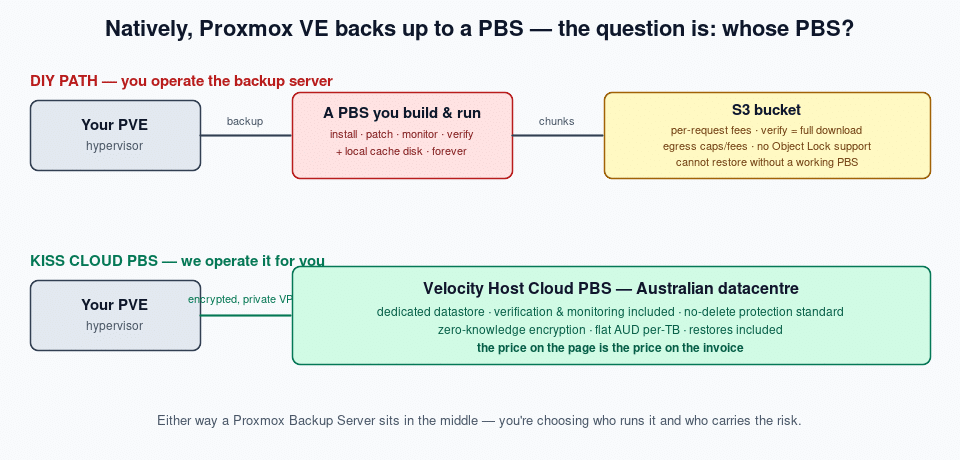
- DIY: you run a PBS (a VM or a server), point it at a bucket, and take on the operations and the fine print below.
- KISS Cloud PBS: we run the PBS on dedicated Australian hardware, and the price on the page is the price on the invoice.
Verification: where the fine print writes your policy
A backup you never verify is a hope, not a backup. PBS verifies by re-reading every data chunk and re-checking its cryptographic hash. On local storage that’s a disk operation. On S3, it’s a download.
This is not our claim — it’s Proxmox’s. Their staff confirmed on the official forum that on an S3 backend, verification always fetches every chunk from the object store, unconditionally — it cannot use the local cache.
A real, documented case (Proxmox forum, PBS 4.0 + Backblaze B2):
| Backup data stored | ~600 GB |
| Restores performed | Zero |
| Data downloaded in one month | 3.5 TB (daily verification jobs) |
Scale that behaviour to a business-sized dataset and the “cheap” storage tier changes character entirely:
- On AWS S3 (Sydney): egress is billed per GB. Verifying 15 TB of stored backups means downloading 15 TB — roughly A$2,000+ in transfer fees per verification run, before request charges.
- On “free egress” providers, it depends on the fine print. Backblaze B2 (the provider in the case above) gives free egress up to roughly 3× your stored volume per month — daily verification blew straight through it. Wasabi charges no egress fees at all, but free egress is intended to stay within 1× your stored volume per month; their pricing FAQ states that use cases exceeding the policy “on a regular basis” may have service “limited or suspended” (wasabi.com/pricing/faq). To be fair to Wasabi: a one-off disaster restore is exactly the rare event that wording allows for. The catch is what counts as regular: routine verification is, by definition, regular — a monthly full verify of 15 TB stored consumes the entire monthly allowance as a standing pattern, and there is no paid egress tier: you cannot buy headroom at any price. Your integrity schedule and your recovery buffer share one allowance, and the backstop is a policy decision, not a bill. AWS is the opposite: every gigabyte is billed, every time — at least the meter has a price.
“So just verify monthly, then?” Yes — and let’s be straight about that. Reducing verification frequency is exactly the mitigation Proxmox recommends, a 30–60 day re-verification cycle is entirely legitimate practice for a DR copy, and it’s the policy we run ourselves. If your dataset and provider’s free tier line up, monthly verification on S3 can cost little or nothing. Three things survive that concession:
- On AWS, every run bills regardless of frequency — a monthly pass over 15 TB is still ~A$2,000, twelve times a year.
- On capped providers, your integrity schedule is now bounded by an allowance, not by your risk appetite. Your data-integrity policy is being written by your storage provider’s billing department. Grow your dataset, and your verification headroom shrinks with it.
- Verification at scale is the hard, unglamorous core of running backup infrastructure — IO budgets, staggered schedules, re-verification windows, alerting on failures. We designed our storage arrays around this exact workload. That’s not overhead inside our price. That is the product.
- The second bill: your own internet connection. DIY verification traffic doesn’t just draw on the S3 provider’s allowance — it lands on your link, because your PBS (typically on-premises) is what downloads every chunk to check it. Verifying 15 TB means pulling 15 TB through your site’s internet connection, every cycle. The arithmetic is unforgiving: at 100 Mbps that download takes ~14 days of a saturated line; even at 1 Gbps it’s ~33 hours of heavy traffic — every month — competing with your actual business, and counting against any ISP fair-use or data policies on your NBN or fibre service. It’s a two-fold hit: the provider’s egress allowance and your local bandwidth, monthly. With KISS Cloud PBS, verification happens inside our datacentre on local disk — zero bytes cross your internet connection.
- Minimum-retention fine print (Wasabi): every object is billed for at least 90 days. PBS garbage collection routinely deletes chunks younger than that — you pay for deleted data.
With KISS Cloud PBS, verification is service-managed and included: every snapshot verified on arrival schedule, re-verified on a 30–60 day cycle, on our hardware at local disk speed. The schedule is set by risk, not by an egress meter — and we alert you if a verification ever fails.
The security line item: immutability
Ransomware defence for backups means one thing: your own compromised environment must not be able to destroy its backup history.
- PBS on S3: PBS does not support S3 Object Lock — and enabling Object Lock on the bucket breaks PBS garbage collection and can corrupt the datastore. On this path, immutability is not “extra config” — it’s unavailable.
- KISS Cloud PBS: your access credentials physically cannot delete backups. Retention is enforced on our side, to your schedule. A ransomware event on your site cannot reach your history. Standard, for every client, at no extra cost.
Worked example: 15 TB of Proxmox backups, monthly
Assumptions stated so you can check our maths: 15 TB stored, AUD, FX ≈ 1.5, DIY labour at a conservative 2–4 hrs/month of sysadmin time at $150/hr for patching, monitoring, verify management and capacity care of a production backup server. Your rates may vary — substitute your own.
On the 15 TB: a 15 TB quota covers roughly 10 TB of protected VMs plus their retention history — our sizing guide of ~1.5× comes from measured production ratios. Actual consumption varies with workload and retention: efficient workloads land under quota, which is your headroom, not our fine print. The same PBS deduplication engine runs in every column, so the storage volumes compare like-for-like.
| Monthly cost line | DIY PBS + budget S3 (Wasabi Sydney) | DIY PBS + AWS S3 (Sydney) | KISS Cloud PBS |
|---|---|---|---|
| Storage | ~A$180 | ~A$525+ | A$750 — 15 TB quota, flat |
| PBS host (VPS/VM + cache disk) | ~A$50–100 | ~A$50–100 | included |
| Your labour (2–4 hrs/mo) | A$300–600 | A$300–600 | A$0 |
| Verification | “Free” — but it’s your allowance and your internet link (15 TB/cycle) | ~A$2,000+ per full run, plus your link | included — zero bytes on your connection |
| Monitoring & alerting | Build it yourself | Build it yourself | included |
| API request fees | Within fair-use | Per-million charges on ~4M chunks/TB | none |
| Immutable / no-delete protection | Not available | Not available | standard |
| Restore 10 TB in a disaster | Free if it’s rare — but no paid headroom exists; enforcement is discretionary | ~A$1,500+ egress | A$0 over the wire (seeded-drive option available, priced by data size/device) |
| Bulk recovery by couriered drive | ❌ Transfer appliance is ingest-oriented, not offered in AU — and raw S3 chunks still need a rebuilt PBS before any VM returns | ❌ Snow-family export: enterprise process, weeks | ✅ Ready-to-restore drive, AU courier, priced by size |
| Someone to call at 2am | ❌ | ❌ (support plans cost extra) | ✅ 1800 937 348 |
| Who sets your verification policy | Your provider’s free tier | Your AWS bill | Service-defined & included |
| Realistic monthly total | A$530–880 + risk | A$875–1,225 + verify/restore fees | A$750 + GST, flat |
The honest conclusion isn’t that S3 is a rip-off — it’s that once you cost the whole job, the “cheap” option lands in the same bracket as ours, minus the safety net. You pay either way: in dollars to us, or in labour, risk, and surprise line items to a bucket
Side-by-side: the whole picture
| KISS Cloud PBS | DIY PBS + S3 | |
|---|---|---|
| Proxmox VE backs up to it directly | ✅ | ⚠️ Only via the PBS you build & operate |
| Deduplication & incremental-forever | ✅ | ✅ (PBS features work on S3) |
| Verification included | ✅ Runs on our hardware | ❌ Downloads your data; you pay the egress/requests |
| Backups your compromised site can’t delete | ✅ Standard | ❌ Object Lock unsupported — breaks the datastore |
| Restore economics | ✅ $0 — transit included; seeded drive for bulk | ⚠️–❌ Egress fees or fair-use caps, on your worst day |
| Data in Australia | ✅ | ⚠️ Possible — but often a US-jurisdiction provider |
| Australian-owned, 19 years (since 2007) | ✅ | — |
| Real person, AU business hours | ✅ Engineers, not scripts | ❌ You are the support team |
| Monitoring, heartbeats, quota alerts | ✅ Included | ❌ Build and maintain it yourself |
| Price certainty | ✅ Flat per-TB — the page is the invoice | ❌ Storage + requests + egress + retention fine print |
| Who patches the backup server | ✅ We do | ❌ You do, forever |
Pros & cons, honestly stated
DIY PBS + S3 — pros: lowest headline storage price; full control; fine for technically strong teams with spare labour, tolerant RTOs, and datasets they rarely verify or restore.
DIY PBS + S3 — cons: you operate a production backup server forever; verification is a download bill or an egress-cap burn; no immutability; restore-day fees; no support; total cost is unknowable in advance.
KISS Cloud PBS — pros: flat AUD pricing, everything included; zero-knowledge encryption; no public attack surface (private VPN only); no-delete protection standard; verification, monitoring, and alerts included; Australian data, Australian company, real people.
KISS Cloud PBS — cons: higher headline $/TB than raw object storage; Proxmox workloads only; restores over your link run at managed speeds (paid seeded-drive and hosted-recovery options exist for when speed matters).
The bottom line
Compare cost per recovered terabyte, not cost per stored terabyte. Storage is cheap everywhere. What you’re actually buying is the certainty that on the worst day of your business, your backups are intact, verified, undeleted, on Australian soil, and coming back — with a person on the phone while they do.
KISS Cloud PBS — you know what you’re paying up front. No hidden costs. No surprise bills. No fine print.
From $90/TB/month + GST, as low as $50/TB at 10 TB+ volume · velocityhost.com.au · 1800 937 348
Sources: Proxmox Backup Server official documentation (S3 datastore backend — pbs.proxmox.com/docs/storage.html); Proxmox staff statements and user-reported billing on the official Proxmox forum, October 2025 — read the thread; provider public pricing and published fair-use terms as at July 2026 (Wasabi free egress policy: wasabi.com/pricing/faq). Figures converted to AUD at ~1.5 and rounded; verify current pricing with providers before relying on specific numbers.