VelocityBlog
Full vs Incremental vs Differential Backup: Understanding the Differences
Updated: May 5, 2026
Published: April 14, 2026
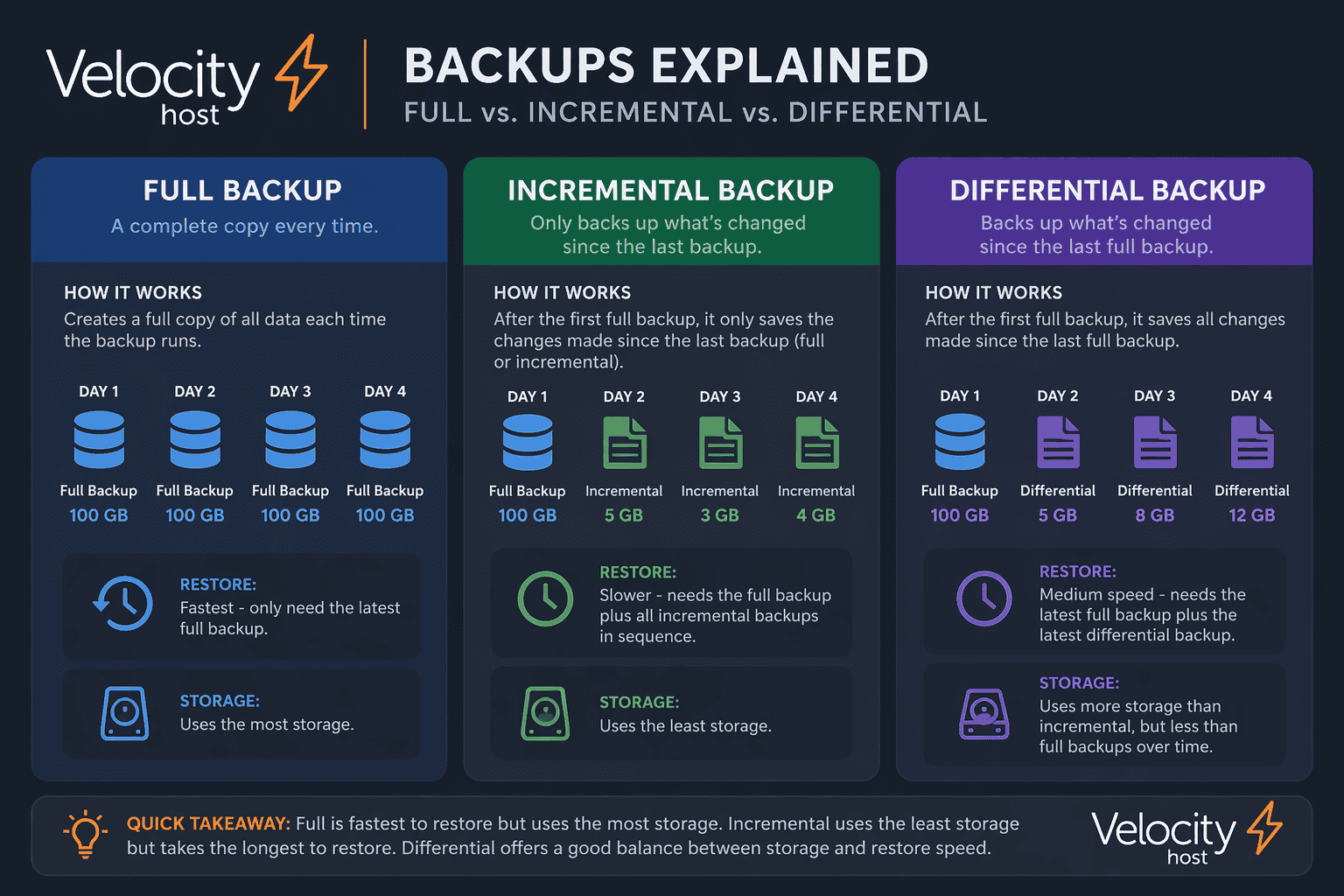
For Australian business decision makers, selecting the right backup strategy is imperative. Understanding the difference between a full backup and an incremental backup, along with differential backup alternatives, determines how quickly your organisation recovers from data loss and how efficiently you use your storage resources.
This comprehensive guide examines the three types of backups, their advantages and limitations, and how to implement an effective backup strategy that protects your business data while keeping costs manageable. With Australian data protection regulations tightening and cyber threats increasing every year, choosing the right backup type has never been more important.
The Three Types of Backups Explained
Modern backup strategies rely on three fundamental approaches. Each backup type serves a distinct purpose, and most organisations combine multiple methods to balance protection, speed, and storage efficiency.
Full Backup: The Complete Copy
A full backup creates a complete copy of all selected data at a specific point in time. When you perform a full backup, every file, folder, database, and system configuration is copied to backup storage, regardless of whether anything has changed since the previous backup.
This represents the simplest backup approach. The process copies all data from source to destination without selective criteria. For example, if your business maintains a 500GB file server, a full backup copies all 500GB of that server each time it runs.
Full backups provide several advantages. Recovery is straightforward because you need only one backup set to restore your entire system. There is no dependency on previous backups, eliminating the risk of broken backup chains. Additionally, full backups serve as clean baselines for other backup types.
However, full backups present significant challenges. They consume substantial time. Backing up terabytes of data can take hours, potentially impacting system performance during business hours. They demand extensive storage space, as each full backup requires capacity equal to your entire dataset. They also consume significant network bandwidth, particularly problematic for remote offices or cloud backups.
Most organisations run full backups weekly or monthly rather than daily, using them as foundations for more frequent incremental or differential backups.
Incremental Backup: Capturing Changes Since Last Backup
An incremental backup copies only files that have changed since the last backup of any type. This could be since the last full backup or since the last incremental backup, making incremental backups highly efficient for daily use.
Consider this example across a work week. On Sunday, you perform a full backup of 500GB. On Monday, only 20GB of files change. Your incremental backup copies just those 20GB. On Tuesday, another 15GB changes. The Tuesday incremental backup copies only that 15GB, not the Monday changes. Wednesday’s incremental backup captures only Wednesday’s changes, and so on.
The advantages of incremental backup are compelling. Backup speed is exceptional because only changed data is processed. Storage efficiency is optimal, as you store only actual changes rather than duplicating unchanged files. Network impact is minimal, making incremental backups ideal for bandwidth-constrained environments.
The primary disadvantage of incremental backup relates to recovery complexity. Restoring data requires the last full backup plus every subsequent incremental backup in sequence. If you need to restore data from Thursday, you must process Sunday’s full backup, then Monday’s incremental, Tuesday’s incremental, Wednesday’s incremental, and finally Thursday’s incremental. This sequential processing extends recovery time.
Additionally, if any incremental backup in the chain becomes corrupted or missing, you cannot restore data from backups that followed it. This creates vulnerability in the backup chain.
Differential Backup: Changes Since Last Full Backup
A differential backup takes a middle path, copying all files that have changed since the last full backup. Unlike incremental backups that reference the last backup of any type, differential backups always reference the last full backup.
Using the same weekly example, Sunday’s full backup captures 500GB. Monday’s differential backup copies the 20GB that changed since Sunday. Tuesday’s differential backup copies all changes since Sunday, which now includes Monday’s 20GB plus Tuesday’s 15GB, totalling 35GB. Wednesday’s differential backup copies all changes since Sunday, now including Monday, Tuesday, and Wednesday changes, perhaps totalling 50GB.
Notice how differential backups grow progressively larger each day until the next full backup. The size increases daily as more files change throughout the week.
Differential backups offer faster recovery than incremental backups. You only need two backup sets: the last full backup and the most recent differential backup. This simplifies recovery and reduces the risk of broken backup chains.
However, differential backups require more storage space than incremental backups because each differential contains cumulative changes. Backup windows expand throughout the week as differential backups grow larger. By Friday, your differential backup might approach the size of a full backup if significant data changes occur.
Full Backup vs Incremental Backup: Direct Comparison
The difference between a full backup and an incremental backup determines your backup and recovery profile. Understanding these trade-offs helps Australian businesses make informed decisions.
Backup Speed and Efficiency
Full backups are the slowest backup type. Processing the entire dataset takes substantial time, particularly for large environments. Organisations with terabytes of data might find full backups taking 8-12 hours or longer.
Incremental backups are the fastest backup type. Since they process only changed files, incremental backups complete quickly, often finishing in minutes rather than hours. This speed makes daily or even hourly incremental backups practical.
Storage Requirements
Full backups consume the most storage space. Each full backup requires storage equal to your entire data store. Maintaining multiple full backups multiplies storage requirements significantly.
Incremental backups uses storage in the most efficient way. You store one full backup as a baseline, then accumulate small incremental backups representing the daily changes. This approach dramatically reduces storage costs, particularly relevant for cloud backup scenarios where storage pricing is usage based.
Recovery Time and Complexity
Full backups provide the fastest, simplest recovery. You restore from a single backup set, and the process is straightforward. No dependencies on other backups exist, eliminating potential complications.
Incremental backups create the slowest, most complex recovery scenario. You must restore the base full backup, then sequentially apply each incremental backup in chronological order. For weekly backups, this might mean processing seven or more backup sets. If recovering from a Friday backup, you restore Sunday’s full backup followed by Monday through Friday incremental backups in sequence.
This sequential restoration takes time and introduces risk. If any incremental backup in the chain is damaged, missing, or corrupted, you cannot complete the restore. The backup chain breaks, and data recovery fails at that point.
Differential vs Incremental Backup: Choosing the Right Strategy
The key difference between incremental and differential backups lies in their reference point. Incremental backups reference the last backup of any type, while differential backups always reference the last full backup.
When Incremental Backup is Better Than Full Backup
Incremental backups excel in specific scenarios. If your organisation operates in bandwidth-constrained environments, incremental backups minimise network traffic. For businesses backing up to cloud storage where bandwidth costs matter, this is significant.
Incremental backups suit organisations with limited backup windows. If you can only run backups during a narrow time frame, incremental backups complete quickly, fitting within tight schedules.
Storage-constrained environments benefit from incremental backups. When storage costs are prohibitive or physical storage space is limited, incremental backups’ storage efficiency becomes crucial.
What is the Main Disadvantage of Incremental Backup?
The main disadvantage of incremental backup is recovery complexity and time. Incremental backups can be time-consuming and complex to restore, requiring the first full backup and all subsequent incremental backups to restore data.
This creates operational risk. If your business experiences data loss on Friday afternoon and requires immediate restoration, the sequential processing of multiple backup sets delays recovery. In disaster recovery scenarios where downtime directly impacts revenue, this delay can be costly.
Additionally, the backup chain vulnerability presents risk. Any corruption, deletion, or damage to an incremental backup renders all subsequent backups in that chain unusable. This dependency makes incremental backup strategies more fragile than alternatives.
Is Incremental or Differential Backup Faster?
For backup operations, incremental backups are faster. They process the smallest amount of data, copying only changes since the last backup of any type. This minimises backup time, network utilisation, and system impact.
For recovery operations, differential backups are faster. You only need two backup sets: the last full backup and the latest differential backup. This two-step process completes more quickly than incremental restoration requiring multiple sequential backups.
The speed question depends on whether you prioritise backup efficiency or recovery efficiency. Organisations where recovery time directly impacts business continuity often prefer differential backups despite their higher storage requirements.
What are the Advantages of Differential Backup?
Differential backups provide several key advantages. Recovery is simpler and faster than incremental backups, requiring only the base full backup and the latest differential backup. This two-step process reduces recovery time, critical for minimising downtime.
The backup chain is more resilient. If one differential backup becomes corrupted, other differential backups remain usable because each differential independently references the full backup. They are not dependent on each other like incremental backups.
According to TechTarget, when speed is important, such as in a disaster recovery scenario where downtime is unacceptable, rapid restores can be crucial. Restoring a differential backup never requires more than two backup sets.
Differential backups balance storage efficiency and recovery speed. While they use more storage than incremental backups, they use significantly less than daily full backups while maintaining reasonable recovery times.
Understanding the 3-2-1 Rule for Backups
Beyond choosing between full, incremental, and differential backup types, Australian businesses should implement the 3-2-1 backup rule, a fundamental data protection strategy.
What is the 3-2-1 Rule for Backups?
The 3-2-1 rule is a backup best practice that recommends:
- Three copies of your data (the original plus two backups)
- Two different types of storage media
- One copy stored off-site
This strategy, attributed to photographer Peter Krogh, provides redundancy and protection against multiple failure scenarios. While originally conceived before widespread cloud adoption, the principle remains relevant and has evolved to address modern threats.
The three copies protect against hardware failure and human error. If your primary data becomes corrupted and one backup fails, you still have a second backup available.
Two different storage media types reduce vulnerability to media-specific failures. For example, maintaining backups on both local network-attached storage (NAS) and cloud storage protects against a single point of failure. If your NAS device fails, your cloud backups remain accessible.
The off-site copy protects against site-specific disasters. Fire, flood, theft, or other localised events that might destroy on-premises equipment cannot simultaneously affect geographically separated backups. For Australian businesses, this might mean storing backups in a different city or utilising cloud storage in a separate region.
Modern Adaptations: The 3-2-1-1-0 Rule
Contemporary backup strategies have expanded the 3-2-1 rule to 3-2-1-1-0, addressing evolving cyber threats:
- Three copies of data
- Two different storage media
- One off-site copy
- One immutable or air-gapped copy
- Zero errors in backup verification
The additional “1” represents an immutable backup. Immutable backups use write-once-read-many (WORM) technology, making backup files unmodifiable. Even if ransomware encrypts your primary data and networked backups, immutable backups remain untouched and recoverable.
Air-gapped backups, physically disconnected from networks, provide similar protection. These backups cannot be accessed by ransomware or malicious actors unless they gain physical access to backup storage.
The “0” emphasises zero errors through continuous verification. Backups are only valuable if they are restorable. Regular testing ensures your backup strategy actually works when needed. According to the US Chamber of Commerce, businesses should practice restoring files at least quarterly to consistently meet recovery point objectives (RPO) and recovery time objectives (RTO).
Implementing an Effective Backup Strategy for Australian Business
Selecting the right backup type requires understanding your specific business requirements. Australian businesses face unique considerations including data sovereignty requirements under the Australian Privacy Act and the increasing sophistication of cyber threats.
Assessing Your Backup Needs
Begin by evaluating several key factors:
Recovery Time Objective (RTO) defines how quickly you must restore operations after data loss. If your business cannot tolerate more than one hour of downtime, you need backup strategies that support rapid recovery. This favours full backups or differential backups over long incremental backup chains.
Recovery Point Objective (RPO) determines the maximum acceptable data loss. If you can afford to lose up to 24 hours of data, daily backups suffice. If you cannot lose more than one hour of work, you need hourly backups, making incremental backups attractive due to their speed and efficiency.
Data change rate influences backup strategy selection. Environments where large volumes of data change daily might find differential backups growing too large. Conversely, environments with minimal daily changes benefit from differential backup efficiency.
Storage capacity and costs impact strategy decisions. Cloud storage pricing in Australia varies by provider and region. If storage costs are prohibitive, incremental backups’ storage efficiency becomes important. If storage is affordable but downtime is costly, differential or full backups make more sense.
Recommended Backup Strategies
Most organisations benefit from hybrid approaches combining multiple backup types:
Weekly full + daily incremental: This common strategy balances efficiency and recoverability. Run full backups weekly (typically Sunday night or during low-activity periods) with daily incremental backups Monday through Saturday. This approach minimises storage and backup time while keeping recovery complexity manageable. Maximum recovery requires the weekly full backup plus up to six daily incremental backups.
Weekly full + daily differential: This strategy prioritises faster recovery over storage efficiency. Weekly full backups establish baselines, while daily differential backups capture cumulative weekly changes. Recovery requires only two backup sets: the weekly full backup and the most recent differential backup. Storage requirements are higher because differential backups grow throughout the week.
Monthly full + weekly differential + daily incremental: This three-tier approach suits large environments where full backups take substantial time. Monthly full backups provide clean baselines. Weekly differential backups capture weekly changes. Daily incremental backups handle day-to-day changes efficiently. Recovery complexity increases, but backup efficiency improves.
Data Protection Considerations for Australian Business
Australian organisations must consider data sovereignty when implementing backup strategies. The Privacy Act and Australian Privacy Principles require reasonable steps to protect personal information. For many businesses, this means ensuring backups containing Australian customer data remain within Australian jurisdiction.
VelocityHost’s use of Australia’s only Tier 4 data centre addresses this requirement, providing enterprise-grade infrastructure for backup storage with guaranteed Australian data residency. This eliminates concerns about offshore backup storage potentially complicating regulatory compliance.
Cyber threats targeting Australian businesses have increased significantly. According to industry statistics, over 72 percent of businesses worldwide have fallen victim to ransomware attacks. Australian businesses are not exempt from this trend.
Ransomware increasingly targets backups alongside primary data. Attackers know organisations rely on backups for recovery and deliberately attempt to encrypt or delete backup files. This makes immutable backups or air-gapped backups essential components of modern backup strategies.
Frequently Asked Questions
What are the Three Types of Backups?
The three main types of backups are full backup, incremental backup, and differential backup. A full backup copies all selected data. An incremental backup copies only files changed since the last backup of any type. A differential backup copies all files changed since the last full backup.
Each backup type serves different purposes, and most organisations combine them in comprehensive backup strategies rather than relying on a single type.
What is the Difference Between a Full Backup and an Incremental Backup?
The fundamental difference between a full backup and an incremental backup is scope. Full backups copy everything regardless of previous backups or changes. Incremental backups copy only data that has changed since the last backup, making them much faster and more storage-efficient but slower and more complex to restore.
Full backups are self-contained, requiring no other backups for restoration. Incremental backups depend on a base full backup and all subsequent incremental backups in sequence for complete restoration.
What is the Key Difference Between Incremental and Differential Backups?
The key difference between incremental and differential backups is their reference point. Incremental backups copy changes since the last backup of any type, whether that was a full backup or another incremental backup. Differential backups always copy changes since the last full backup, regardless of how many differential backups have run since then.
This means incremental backups stay small and consistent in size, while differential backups grow progressively larger until the next full backup resets them.
What is the Difference Between a Differential Backup and a Full Backup?
A differential backup copies only files that have changed since the last full backup, while a full backup copies all files regardless of changes. Differential backups are faster to create and use less storage than full backups, but they require the last full backup for restoration.
Full backups can restore independently, while differential backups require two backup sets: the base full backup and the differential backup itself.
What’s the Difference Between Full Incremental and Differential Backups?
Full backups copy everything and serve as baselines. Incremental backups copy only changes since the last backup of any type, creating small, efficient daily backups but complex recovery chains. Differential backups copy all changes since the last full backup, creating larger daily backups that grow throughout the week but simpler, faster recovery requiring only two backup sets.
The choice between these backup types depends on balancing backup speed, storage requirements, and recovery time objectives.
Is Incremental Backup Better Than Full Backup?
Neither backup type is universally better. The answer depends on your specific requirements. Incremental backups are better when storage space is limited, backup windows are narrow, or network bandwidth is constrained. They complete quickly and use minimal storage.
Full backups are better when recovery speed is critical, backup complexity must be minimised, or you need self-contained backup sets that do not depend on other backups. Recovery from full backups is straightforward and fast.
Most organisations use both, combining weekly or monthly full backups with daily incremental backups to balance efficiency and recoverability.
What is the Main Disadvantage of Incremental Backup?
The main disadvantage of incremental backup is recovery complexity and time. Restoring from incremental backups requires the full backup file plus every subsequent incremental backup in chronological order. This sequential processing takes time and creates vulnerability. If any backup in the chain is damaged or missing, you cannot restore data from backups that follow.
For businesses where rapid recovery is critical, this disadvantage often outweighs incremental backups’ storage and speed advantages.
What are the Advantages of Differential Backup?
Differential backups offer several advantages. They provide faster recovery than incremental backups, requiring only the last full backup and the most recent differential backup. This simplicity reduces recovery time and complexity.
Differential backups are more resilient than incremental backups. Each differential backup independently references the full backup, so if one differential backup is corrupted, others remain usable. The backup chain is less fragile.
They balance storage efficiency and recovery speed, using significantly less storage than daily full backups while maintaining faster recovery than long incremental chains.
What is the 3-2-1 Rule for Backups?
The 3-2-1 rule for backups is a best practice strategy requiring three copies of your data (the original plus two backups), stored on two different types of media, with one copy kept off-site. This redundancy protects against hardware failures, site-specific disasters, and various data loss scenarios.
Modern adaptations like the 3-2-1-1-0 rule add immutable backups and error-free verification to address contemporary threats like ransomware.
Making the Right Backup Strategy Choice
Selecting between full vs incremental vs differential backup types is not an either-or decision. Effective backup strategies combine multiple backup types, leverage the 3-2-1 rule for redundancy, and align with business requirements for recovery time and data protection.
For Australian businesses, several considerations are paramount. Data sovereignty requires keeping sensitive information within Australian jurisdiction. VelocityHost’s Australian Tier 4 data centre addresses this requirement while providing enterprise-grade reliability.
Cyber threats demand robust backup strategies with immutable copies that ransomware cannot compromise. Regular testing ensures backups are actually restorable when needed, not just theoretical protection.
Cost efficiency matters, but not at the expense of business continuity. The true cost of backup strategies includes both storage expenses and potential downtime costs. A backup strategy that saves on storage but extends recovery time by hours may cost far more in lost business than it saves in infrastructure.
The difference between a full backup and an incremental backup affects both operational efficiency and disaster recovery capabilities. Understanding these differences, along with differential backup advantages, enables informed decisions that protect your business data while optimising resources.
VelocityHost’s boutique approach to hosting and IT services, combined with access to Australia’s only Tier 4 data centre, provides Australian businesses with the infrastructure and expertise needed to implement backup strategies that balance protection, performance, and compliance. Whether you choose incremental backups for efficiency, differential backups for balanced recovery, or full backups for simplicity, the right infrastructure and strategy ensure your data remains protected and recoverable when it matters most.
Email Us to see how we can help...

Gerardo Altman, Director of Problem Solving
With over 25 years’ experience in the IT industry, Gerardo Altman is a key solutions architect and MD of Velocity Host, with a love for Tetris and complex puzzles of every nature you'll find me hard at work doing what I do best – finding solutions.
Nextcloud Features & Apps: Complete Guide for Australian Businesses
There is a common assumption among Australian business owners that Nextcloud is a lightweight alternative to Microsoft 365 or Google Workspace, useful for basic file storage but not a serious contender for day to day business collaboration. That assumption no longer holds up. The platform has matured into a full…
Nextcloud Hosting Australia: VPS, Self-Hosted and Managed Options
What Is Nextcloud? Nextcloud is an open-source platform for file storage, synchronisation and collaboration. Rather than simply providing online storage, it can bring files, calendars, contacts, chat, video conferencing and collaborative document editing together in one environment. Nextcloud’s platform overview provides more detail on the platform and its collaboration capabilities.…
Nextcloud Auditing: A Complete Guide to Nextcloud Audit Logs
If a staff member left tomorrow, could your business say exactly which client files they opened in their final month? Not just what they changed, but what they viewed, downloaded or shared, and when? For most Australian businesses, the honest answer is no. That gap is exactly what the nextcloud…
Don’t Pay for SEO (Unless You Are Able To Do These Things)
Most Australian small business owners who come to us with high expectations for SEO. Our SEO campaigns are capable of delivering leads, but the success of a campaign also depends on whether your business is operationally ready to make the most of the enquiries and visibility that SEO generates. VelocityHost…
How to Backup NAS to Cloud Storage For Secure Data Protection
Protecting your Network Attached Storage (NAS) data is essential for any organisation that handles critical information. While NAS systems provide excellent local storage capabilities, combining them with cloud backup creates a robust defence against data loss, ransomware attacks, and hardware failures. This guide explains the best NAS backup strategy, explores…